- Python 实现迷宫小游戏:从 0 到 1 的实战教程
- 1. 最终效果
- 2. 地图如何表示
- 3. 绘制界面
- 4. 移动与碰撞检测
- 5. 胜利判定与重开
- 6. 完整运行方式
- 7. 可以继续升级什么
- 8. 小结
- 完整代码
Python 实现迷宫小游戏:从 0 到 1 的实战教程
今天我们用 Python 做一个迷宫小游戏。
目标很简单:用方向键控制小球,从起点走到终点,不能穿墙,走到终点就提示通关。
项目完整代码在 maze_game.py,基于 tkinter,不依赖第三方库,适合初学者上手 GUI 小游戏开发。
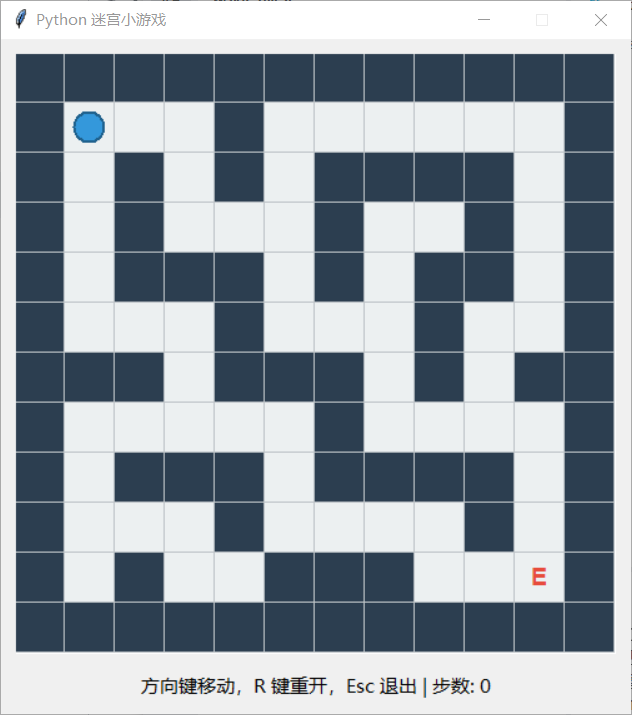
1. 最终效果
- 方向键移动玩家
- 障碍物不可穿越
- 页面底部显示步数
- 到达终点弹窗提示
- 按
R可重开,按Esc可退出
2. 地图如何表示
迷宫最常见的表示方式是二维数组:
1表示墙(不可通过)0表示路(可通过)
示意(节选):
MAZE_MAP = [
    [1, 1, 1, 1, 1],
    [1, 0, 0, 0, 1],
    [1, 0, 1, 0, 1],
    [1, 0, 0, 0, 1],
    [1, 1, 1, 1, 1],
]
通过这种结构,我们可以非常方便地做“边界判断”和“是否撞墙”的逻辑。
3. 绘制界面
我们使用 tk.Canvas 来画迷宫网格:
- 遍历每个格子
- 墙体填充深色,路径填充浅色
- 单独标记起点
S和终点E
玩家本体可以画成一个圆形(create_oval),每次移动后重绘到新位置。
4. 移动与碰撞检测
按下方向键后,会得到一个位移向量:
- 上:
(-1, 0) - 下:
(1, 0) - 左:
(0, -1) - 右:
(0, 1)
然后计算目标位置 (nr, nc),依次判断:
- 是否越界
- 是否撞墙
都通过才更新玩家坐标,并让步数 +1。
5. 胜利判定与重开
当玩家坐标等于终点坐标时,游戏结束并弹出提示框,显示总步数。
重开逻辑也很简单:把玩家坐标、步数、游戏状态恢复初始值,再重绘一次。
6. 完整运行方式
在项目目录执行:
python maze_game.py
如果能看到窗口并通过方向键移动,就说明运行成功。
7. 可以继续升级什么
如果你想把这个小游戏做成“可发布项目”,可以继续扩展:
- 随机迷宫生成(每次开局都不同)
- 加入倒计时与星级评分
- 增加多个关卡与存档
- 做自动寻路提示(BFS / A*)
- 换成
pygame实现更流畅的动画与音效
8. 小结
这个迷宫小游戏覆盖了 GUI 开发中的几个关键点:
- 二维数据结构建模
- 键盘事件绑定
- 状态更新与界面重绘
- 游戏规则判定
如果你是 Python 初学者,这是一个非常适合练手并可持续迭代的项目。
建议你下一步尝试:自己设计一张更复杂的迷宫地图,然后加入“计时排行榜”功能。
完整代码
import tkinter as tk
from tkinter import messagebox


CELL_SIZE = 40

# 1 = 墙,0 = 路
MAZE_MAP = [
    [1, 1, 1, 1, 1, 1, 1, 1, 1, 1, 1, 1],
    [1, 0, 0, 0, 1, 0, 0, 0, 0, 0, 0, 1],
    [1, 0, 1, 0, 1, 0, 1, 1, 1, 1, 0, 1],
    [1, 0, 1, 0, 0, 0, 1, 0, 0, 1, 0, 1],
    [1, 0, 1, 1, 1, 0, 1, 0, 1, 1, 0, 1],
    [1, 0, 0, 0, 1, 0, 0, 0, 1, 0, 0, 1],
    [1, 1, 1, 0, 1, 1, 1, 0, 1, 0, 1, 1],
    [1, 0, 0, 0, 0, 0, 1, 0, 0, 0, 0, 1],
    [1, 0, 1, 1, 1, 0, 1, 1, 1, 1, 0, 1],
    [1, 0, 0, 0, 1, 0, 0, 0, 0, 1, 0, 1],
    [1, 0, 1, 0, 0, 1, 1, 1, 0, 0, 0, 1],
    [1, 1, 1, 1, 1, 1, 1, 1, 1, 1, 1, 1],
]

START_POS = (1, 1)   # (行, 列)
END_POS = (10, 10)   # (行, 列)


class MazeGame:
    def __init__(self, root: tk.Tk):
        self.root = root
        self.root.title("Python 迷宫小游戏")

        self.rows = len(MAZE_MAP)
        self.cols = len(MAZE_MAP[0])
        self.width = self.cols * CELL_SIZE
        self.height = self.rows * CELL_SIZE

        self.canvas = tk.Canvas(self.root, width=self.width, height=self.height, bg="white")
        self.canvas.pack(padx=10, pady=10)

        self.info_label = tk.Label(
            self.root,
            text="方向键移动,R 键重开,Esc 退出",
            font=("Microsoft YaHei", 11),
        )
        self.info_label.pack(pady=(0, 10))

        self.player = list(START_POS)
        self.step_count = 0
        self.game_over = False

        self.draw_map()
        self.draw_player()

        self.root.bind("<Up>", lambda _: self.move(-1, 0))
        self.root.bind("<Down>", lambda _: self.move(1, 0))
        self.root.bind("<Left>", lambda _: self.move(0, -1))
        self.root.bind("<Right>", lambda _: self.move(0, 1))
        self.root.bind("<r>", lambda _: self.reset_game())
        self.root.bind("<R>", lambda _: self.reset_game())
        self.root.bind("<Escape>", lambda _: self.root.destroy())

    def draw_map(self):
        self.canvas.delete("map")
        for r in range(self.rows):
            for c in range(self.cols):
                x1 = c * CELL_SIZE
                y1 = r * CELL_SIZE
                x2 = x1 + CELL_SIZE
                y2 = y1 + CELL_SIZE

                if MAZE_MAP[r][c] == 1:
                    color = "#2C3E50"  # 墙
                else:
                    color = "#ECF0F1"  # 路

                self.canvas.create_rectangle(
                    x1, y1, x2, y2,
                    fill=color,
                    outline="#BDC3C7",
                    tags="map"
                )

        # 起点与终点标记
        self._draw_cell_label(START_POS, "S", "#27AE60")
        self._draw_cell_label(END_POS, "E", "#E74C3C")

    def _draw_cell_label(self, pos, text, color):
        r, c = pos
        cx = c * CELL_SIZE + CELL_SIZE / 2
        cy = r * CELL_SIZE + CELL_SIZE / 2
        self.canvas.create_text(
            cx, cy,
            text=text,
            fill=color,
            font=("Arial", 14, "bold"),
            tags="map"
        )

    def draw_player(self):
        self.canvas.delete("player")
        r, c = self.player
        x1 = c * CELL_SIZE + 8
        y1 = r * CELL_SIZE + 8
        x2 = x1 + CELL_SIZE - 16
        y2 = y1 + CELL_SIZE - 16
        self.canvas.create_oval(
            x1, y1, x2, y2,
            fill="#3498DB",
            outline="#1F618D",
            width=2,
            tags="player"
        )
        self.info_label.config(
            text=f"方向键移动,R 键重开,Esc 退出 | 步数: {self.step_count}"
        )

    def can_move_to(self, row, col):
        if row < 0 or row >= self.rows or col < 0 or col >= self.cols:
            return False
        return MAZE_MAP[row][col] == 0

    def move(self, dr, dc):
        if self.game_over:
            return

        nr = self.player[0] + dr
        nc = self.player[1] + dc
        if not self.can_move_to(nr, nc):
            return

        self.player = [nr, nc]
        self.step_count += 1
        self.draw_player()

        if tuple(self.player) == END_POS:
            self.game_over = True
            messagebox.showinfo("恭喜", f"你走出迷宫了!\n总步数:{self.step_count}\n按 R 可以再来一局。")

    def reset_game(self):
        self.player = list(START_POS)
        self.step_count = 0
        self.game_over = False
        self.draw_map()
        self.draw_player()


if __name__ == "__main__":
    app = tk.Tk()
    MazeGame(app)
    app.resizable(False, False)
    app.mainloop()